
Open source · Apache-2.0 · Self-hosted
An open source agentic harness for the Salesforce admin
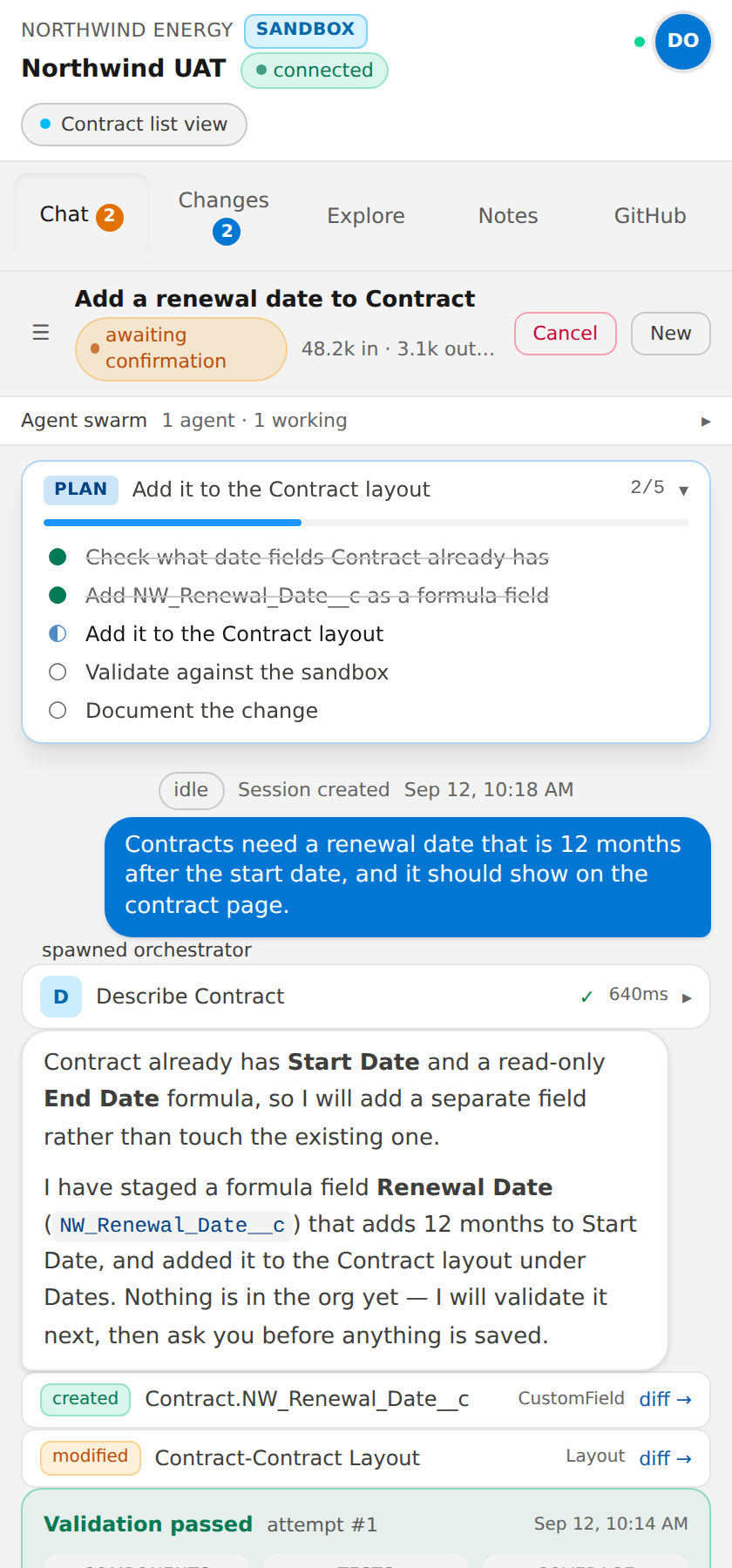
SF Claws gives Salesforce admins a Claude Code style agent in a Chrome side panel. Describe the change in plain language. A swarm of agents investigates the org, plans the work, builds the metadata, validates it against the org until it is clean, asks before anything impactful happens, and commits to GitHub with a visual diff.
- Bring your own model
- Claude, OpenAI, DeepSeek, DeepInfra
- Before every deploy
- Validation and a human yes
- Every change
- Committed to git with a diff
Who it is for
For the people who know the business process, not the XML
And for the developers, consultancies and ISVs who want to hand those people a safe way to use AI in a client org.
Salesforce admins
Describe the change in business terms. The agents investigate the org, propose a plan, build the metadata and validate it before you approve a deploy. No XML, no IDE, no git commands.
Salesforce developers
Every change lands in the client repository as SFDX source with a visual diff. Review it like any other pull request, or let the harness own the routine work while you keep the hard parts.
Consultancies and SIs
One deployment serves many clients. Per-client credentials, orgs, GitHub repositories, spend ceilings and standing instructions, all isolated from the admins doing the work.
ISVs and OEMs
Link your documentation and product source repositories as knowledge. Subscriber orgs get configured around your managed package by agents that have read your docs and your code.
Why we built it
Implementation cost was too high, and admins had no direct way to use AI
3B builds managed packages for staffing and workforce management on Salesforce. Rolling them out to a client means configuring a subscriber org around the package, and that work fell on a small number of people who knew both the product and the metadata. SF Claws started as a way to relieve that pressure inside our own operations team. Five drivers shaped it.
Git for the operations team
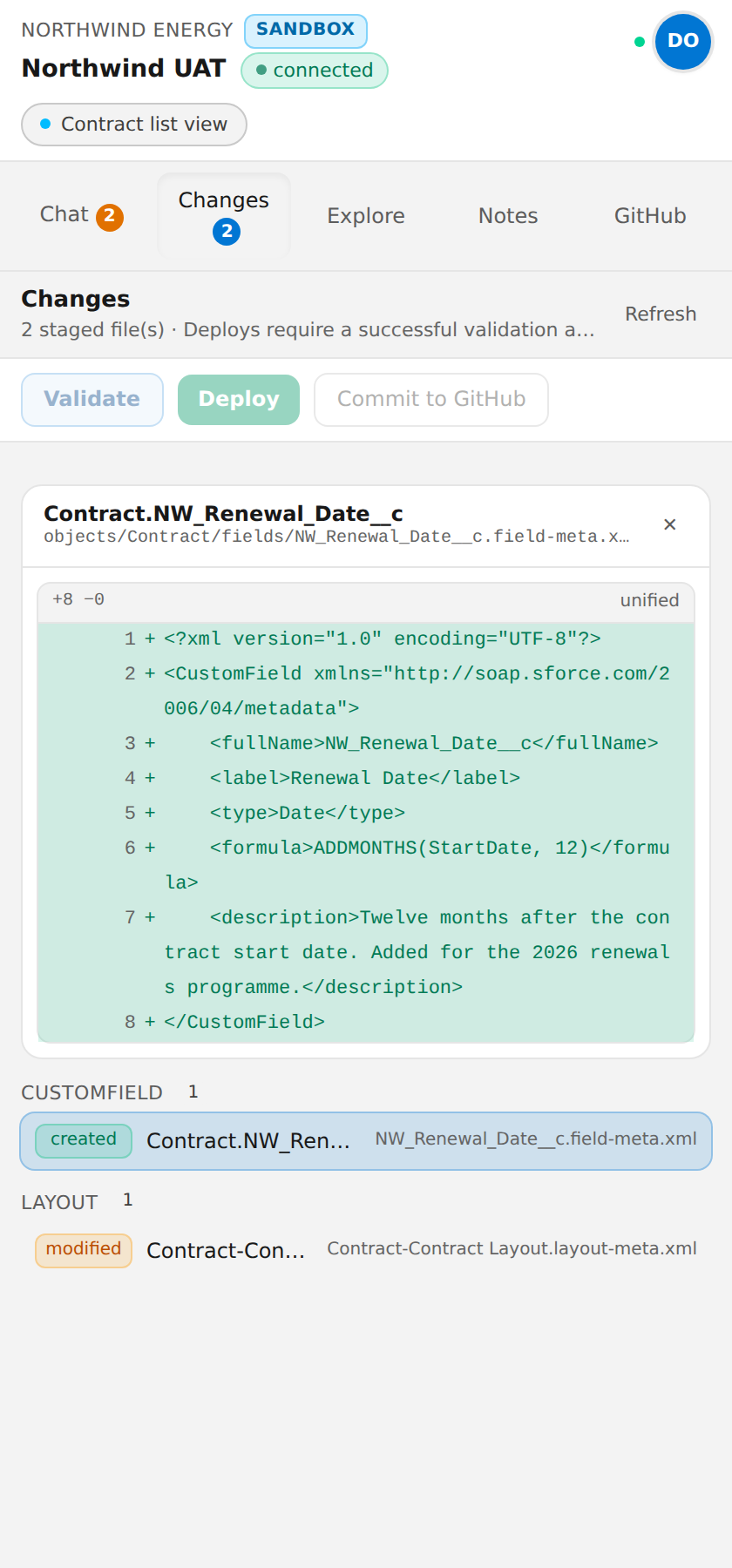
Every change an admin makes is committed to the client repository with a diff, so version control stops being a developer-only habit.
Streamlined admin implementation
Fields, layouts, flows, permissions and validation rules built and validated in one session instead of a week of tickets.
Error reduction
Nothing reaches an org without a real validation deploy passing first, and a reviewer agent checks the work before a human sees it.
AI adoption where the work happens
A side panel on the Salesforce page the admin is already on, not another tab, another tool or another login.
Knowledge transfer
Product documentation and source repositories become context for every session, so the gap between the people who built a product and the people who configure it closes.
How it works
The workflow it enforces
Seven steps, in this order, every time. The agents cannot skip ahead: staging tools stay locked until the plan is approved, and deploy stays locked until validation passes.
- 1
Plan
The lead agent investigates, then submits a plan in Salesforce terms: objects, fields, flows, layouts, permissions, risks and what people will notice. Nothing is staged until you approve it.
- 2
Investigate
Analyst sub-agents query records, describe objects, read metadata and debug logs. Findings go to a shared scratchpad.
- 3
Build
Builder sub-agents stage SFDX source-format metadata in a per-session workspace. The org is untouched.
- 4
Validate until clean
A real checkOnly deploy against the target org. Failures feed back to the builder, which fixes and revalidates until there are zero.
- 5
Review
A reviewer agent checks policy, quality and impact, and re-runs the validation itself rather than trusting the builder.
- 6
Confirm
Every impactful command is shown to you with the exact call and the agent’s plain-language reason. Allow once, allow for the session, or deny.
- 7
Deploy, commit, document
Deploy on confirmation, commit to the client repository, and write documentation that doubles as memory for the next session.
Design principles
Five decisions that shaped SF Claws
01
Bring your own model
Anthropic Claude, OpenAI, DeepSeek or DeepInfra. Bind a model to each agent role, set the price, and keep the keys in your own deployment.
02
Super admin, admin, user
Three roles keep setup, credentials, skills and client configuration away from the admins doing the work. A user sees the orgs they are a member of and nothing else.
03
A context-aware Chrome side panel
The extension reports which Salesforce page and record you are on with every message. It never talks to Salesforce, GitHub or a model itself.
04
Visual, not XML
Org schema, staged changes and proposed implementations are shown as plans, diffs and explorers. Nobody has to become an expert in git, an IDE or metadata XML.
05
Built for managed packages
Link knowledge repositories and managed package source to the platform. Agents configure subscriber orgs around installed packages with the product docs as context.
Open
Read the source, run it yourself
Nothing product-specific is compiled in. Point it at your docs and your repositories.
Where it came from
From Eleftherios to SF Claws
We first built an internal AI assistant called Eleftherios. The name means freedom in Greek, and it is also the name of one of our star developers. Eleftherios reads our product documentation and product source code and resolves questions from our own users and system integrators, with every answer grounded in the docs and the code that runs the org.
It was a success. Asking users for feedback at the end of every session showed how much the tool was doing. It also showed something we did not plan for: users kept asking the assistant to produce metadata files they could deploy to client orgs themselves.
That is where SF Claws was born. Keep what made Eleftherios work, the product knowledge and the grounding, and extend it to modify a client org safely: plan, build, validate, approve, deploy and commit, with the admin in control at every step.
Safety and isolation
Designed for several clients on one deployment, and for agents that are sometimes wrong
Tool calls cannot cross tenants
Every tool reads its target org from the session. No tool takes an org id from the model, so a prompt injection cannot redirect one.
No shell, no filesystem, no interpreter
Agents author metadata. Salesforce validates and executes it. Nothing an agent writes runs on the server.
Per-tenant encryption
Each client’s secrets are encrypted under their own data key, wrapped by the server master key.
Hard spend ceilings
Per-turn, per-session and per-client-month limits checked before each model call, with a reserve so a limit never leaves work half staged.
Everything is audited
Logins, approvals, deploys, commits, configuration changes and per-tool telemetry, visible to super admins.
Enforced scoping
A build-time test fails CI on any unscoped read of tenant-owned data.
Ready when you are
Run it on your own server, use our extension
Deploy the control plane, install the SF Claws Chrome Extension from the Chrome Web Store, point it at your server, and pair the first admin.
Questions
Frequently asked
Is SF Claws free?
Yes. SF Claws is open source under the Apache-2.0 licence. You self-host the control plane and pay your model provider directly for the tokens you use.
Which AI models does it support?
Anthropic Claude, OpenAI, DeepSeek and DeepInfra out of the box. Models are bound per agent role in the admin console, so an orchestrator can run on a frontier model while summarisation runs on a cheaper one.
Do I have to self-host?
Yes. SF Claws is a Node.js control plane with a SQLite database that you run yourself, on a VM, in Docker or on a platform such as Heroku. Your Salesforce refresh tokens, GitHub tokens and model keys never leave your deployment.
Do I need to publish my own Chrome extension?
No. Install the SF Claws Chrome Extension from the Chrome Web Store and point it at your own server. You can also build the extension from source and distribute it through the Web Store or enterprise policy.
Is it safe to point at a production org?
It was designed for it. Metadata is staged and validated with a checkOnly deploy before anything is deployed, every impactful command needs a human approval against an allow list a super admin controls, and everything is audited. Start with a sandbox anyway.
How does this relate to Eleftherios?
Eleftherios is the internal 3B support assistant that reads product documentation and source code to answer implementation questions. Users kept asking it for metadata files to deploy, which is the gap SF Claws fills: the same knowledge, plus the ability to plan, build, validate and deploy the change.